
All the Features
Messaging, security, AI tools, events, expenses, calls, moderation, and more — everything your community needs in one platform.
Messaging
Organized, Threaded, and Clear
Direct Messages
One-on-one private conversations with read receipts, typing indicators, and media sharing.
Group Channels
Named group spaces with descriptions, pinned messages, and member lists.
Threaded Replies
Reply to any message in a thread — keeps conversations organized without clutter.
Pins & Boards
Pin important messages, support image flyers, and keep board updates visible for the whole community.
Message Search
Full-text search across all conversations, groups, and organizations.
Scheduled Messages
Compose now, send later — schedule messages for the perfect time.
Voice Notes
Record and send voice messages directly in any chat.
Media & Files
Share photos, videos, documents, PDFs, and links with rich previews.
Read Receipts
See who has read your message in groups and DMs.
Shared Media Panel
Browse photos, videos, documents, and links from a group in one organized view.
Security & Encryption
Privacy is Architecture, Not a Checkbox
End-to-End Encryption
Encrypts messages, images, videos, voice notes, files, documents, and shared locations. Enable org-wide or per group.
Row-Level Security
Database-level access control. Users only see data within their organizations and groups.
Biometric App Lock
Face ID, Touch ID, and fingerprint support to secure the app on your device.
Session Management
View active sessions, revoke access remotely, and manage trusted devices.
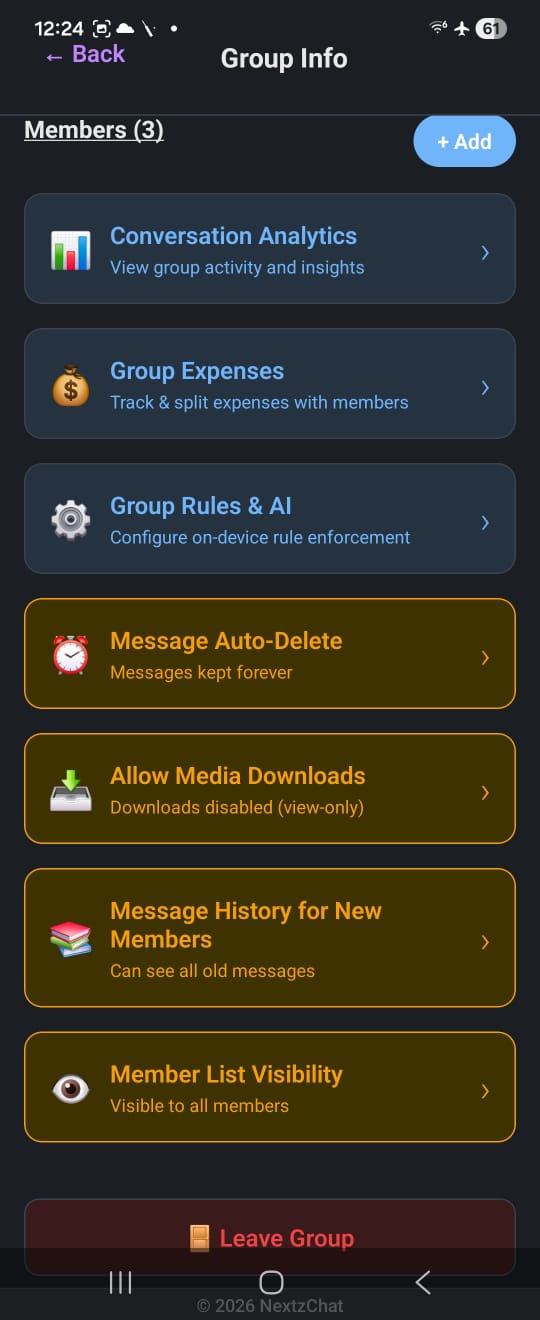
Auto-Delete Messages
Set retention policies — 24 hours, 7 days, 30 days, or custom periods.
Account Deletion
Full account deletion with complete data wipe — permanently removes all your personal data from our systems.
AI Assistant & Planner
Built-in Intelligence That Can Act
AI Composer
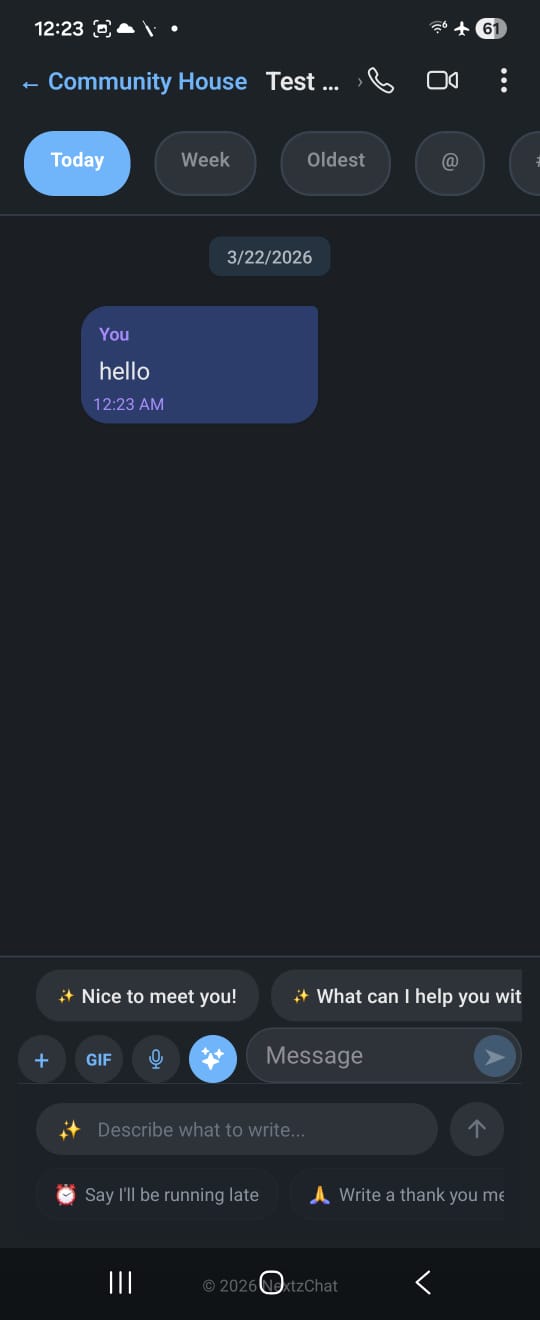
Draft messages, announcements, and replies using built-in AI with tone adjustment.
Smart Replies
AI-suggested quick replies based on conversation context.
Message Rewrite
Highlight any draft and rewrite it — shorter, more professional, or translated.
Sentiment Analysis
AI detects message tone and flags potentially harmful content.
AI Summarization
Catch up on long threads with one-tap AI summaries.
Trip Planner from Chat
Ask the assistant to plan a trip for a destination and duration, then save the result into Planner.
Planner Workspace
Manage stays, todos, expenses, summaries, and AI-assisted edits from a dedicated planner flow.
Moderation & Safety
Trust & Safety at Scale
Message Filtering
Profanity filter, keyword blocklist, and content screening configured per organization.
Duplicate Detection
AI-powered detection stops spam and accidental repeats before they clutter channels.
Spam Protection
Rate limiting, suspicious pattern detection, and automated spam quarantine.
Moderation Queue
Flagged messages appear in a review queue — approve, delete, or escalate.
Audit Log
Every moderation action logged with timestamps, actor, and reason.
Events & Tasks
Organize and Coordinate
Create Events
Schedule events with title, description, date/time, location, and resources.
RSVP & Attendance
Going / Maybe / Not Going — admins see real-time attendance counts.
Reminders
Automatic push notifications before events — 1 hour, 1 day, or custom intervals.
Tasks & Assignments
Assign tasks to members, set due dates, track completion, and send reminders.
Polls
Single choice, multiple choice, or anonymous voting in any group.
Voice & Video Calls
No External App Needed
1:1 & Group Calls
Crystal-clear voice and HD video calls — 1:1 or multi-participant.
Screen Sharing
Share your screen during calls for presentations and collaboration.
Call History
View past calls with duration, participants, and timestamps.
Group Expenses
Split, Track, Settle
Track & Split
Log shared expenses and split equally, by percentage, or custom amounts.
26 Currencies
Choose from a wide currency list and keep group expense tracking localized to how your community operates.
Payment Reminders
Automated nudges for unsettled balances — configurable frequency.
Export Reports
Download expense summaries as CSV or PDF for bookkeeping.
Organizations & Community Admin
Built for Structured Communities
Member Directory
Browse members, roles, and organization structure without losing the context of your groups and DMs.
Role-Based Dashboards
Admins manage groups, announcements, moderation, and member access from organization-aware screens.
Broadcast Messages
Send announcements to multiple groups simultaneously with one compose flow.
Group Catalog & Resources
Share products, classroom resources, links, docs, and rich media in structured organization spaces.
Power Features
Built for Scale
Magic Code Login
Passwordless login — a one-time code via email or SMS.
37+ Integrated Tools
Google Forms, Docs, Sheets, Calendar, Maps, Translate, and more.
OTA Updates
App updates delivered over-the-air — no app store wait times.
Classroom Resources
Support notes, links, flashcards, whiteboards, and school workflows inside education communities.
Ready to Experience It All?
Download NextzChat and unlock every feature for your community — free.
Download Now